|
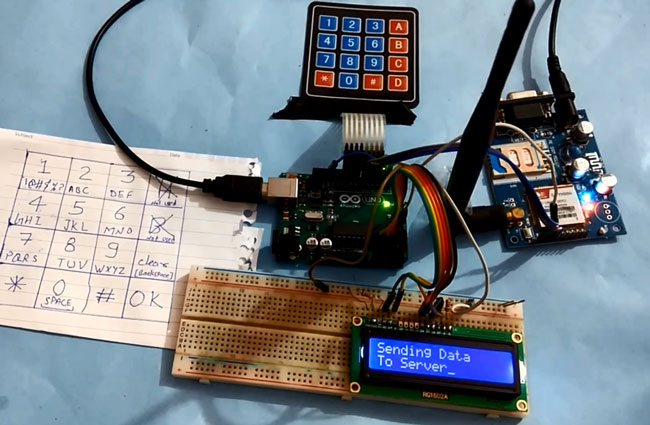
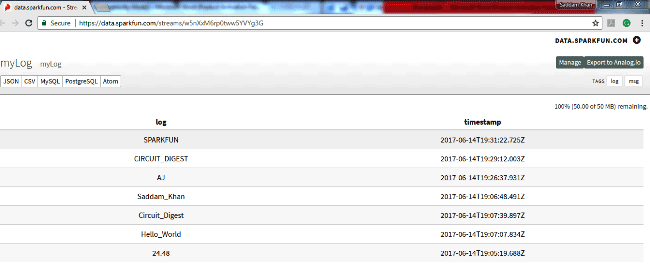
今天我们在这里介绍一个非常有趣的项目,我们将使用Arduino开发板和GPRS将数据发送到SparkFun服务器。这是一个基于IoT的项目,我们将使用GSM模块SIM900A将一些数据发送到互联网上的Web服务器。
在这个项目中,我们将使用4x4数字键盘输入一些文本,并使用Arduino和GPRS将其发送到SparkFun网站,从那里您可以通过互联网在任何地方看到这些数据。在这里,我们还连接了一个16x2液晶显示器,以便在本地查看数据。这种数据发送技术在物联网项目中非常有用,您可以在世界上任何地方监控数据,如监测温度和湿度、监测车辆位置、监测心跳、监测空气污染等等。
所需的组件:
1. Arduino开发板 2. GSM模块SIM900A
3. 16x2 LCD显示屏
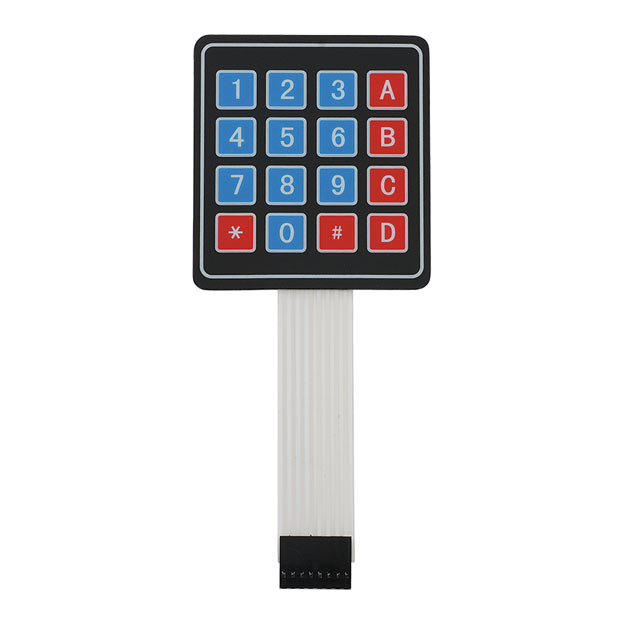
4. 4x4矩阵键盘
5. 面包板或PCB
6. 连接导线
7. 12V电源
8. SIM卡
在GSM模块中使用GPRS
这里我们使用了一个带有SIM卡的GSM模块,用于GPRS连接。在这个项目中,GPRS负责向Sparkfun服务器发送数据。以前,我们已经做了很多项目,其中我们使用Wi-Fi模块ESP8266通过互联网将数据发送到不同的服务器。但这次我们使用的是GPRS。
GPRS代表通用分组无线电服务,其是基于分组的无线通信服务,工作在数据速率为56-114kbps并提供到因特网的连接。
对于GPRS,我们不需要购买任何特殊的模块或硬件,因为GSM已经拥有GPRS设备。我们只需要使用以前的项目中用于GSM接口的相同方法或AT命令来访问它。 SIMCOM SIM900A GSM模块数据表中已经提到了许多AT命令。
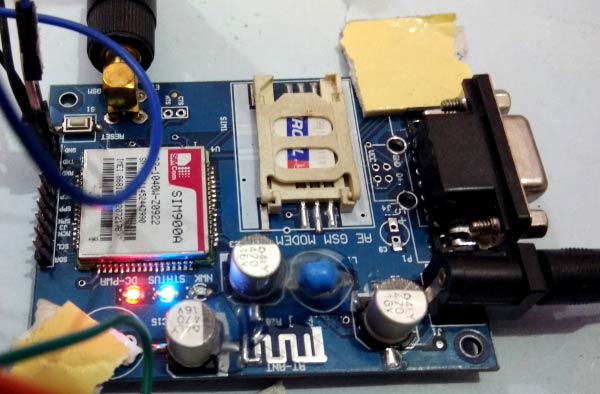
现在通过使用GPRS向服务器发送数据,首先我们需要初始化GSM模块。
GSM初始化命令: - AT: - 该命令用于检查GSM模块是否响应。
- AT + CPIN? : - 该命令用于检查SIM卡是否插入GSM模块。
- ATE0: - 用于禁用回声
- ATE1: - 用于启用回声
GPRS互联网初始化命令: - AT + CIPSHUT: - 关闭TCP端口显式地意味着断开连接
- AT + CGATT? : - 检查SIM卡是否具有互联网连接
- AT + CSTT =“APN”,“userName”,“Pass”: - 连接到互联网
- (例如:AT + CSTT =“airtelgprs.com”,“”,“”)
- AT + CIICR:提出无线网络。检查SIM卡有数据包或余额
- AT + CIFSR: - 获取IP(有时没有这个命令GSM不工作,所以使用这个命令)
- AT + CIPSTART =“TCP”,“SERVER IP”,“PORT”: - 用于创建与我们提供的服务器的TCP连接代替SERVER IP
- AT + CIPSEND: - 该命令用于向服务器发送数据。输入后,此命令服务器请求数据。
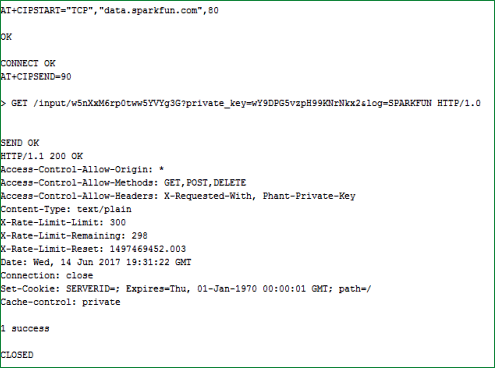
输入数据后,我们发送26到服务器。如果一切顺利的话,数据将被成功发布到服务器,并且SparkFun服务器使用通过或失败的字符串进行响应。
工作原理说明:
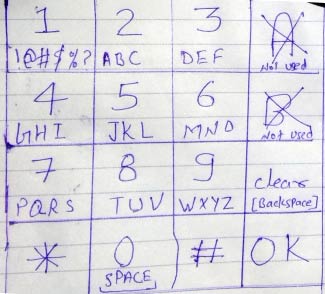
从GSM模块GPRS发送数据的过程很简单。在这个项目中,我们通过使用键盘输入一些字符串或单词,并发送到服务器。相同的字符串或单词将出现在LCD上,然后按D / OK将输入字符串发送到服务器。在这里,我们创建了一个字母数字键盘,用于将字符或数字值输入到Arduino或LCD。 C /清除编程为退格。
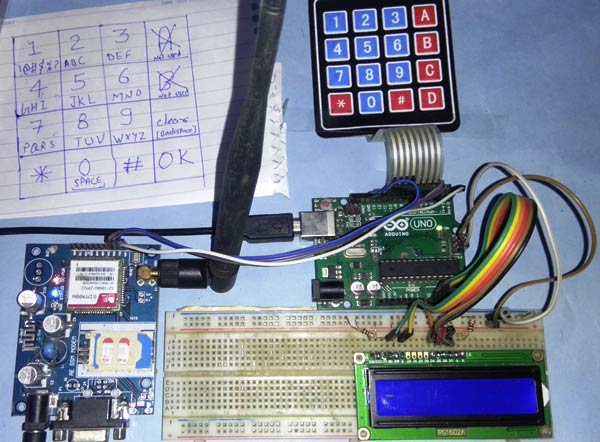
字母数字是通过使用相同的4x4矩阵键盘输入数字和字母的方法。这里我们编码了同样的4x4键盘,Arduino也接受字母。检查文章末尾的完整代码。
电路说明:
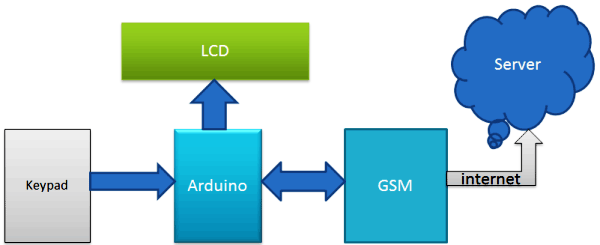
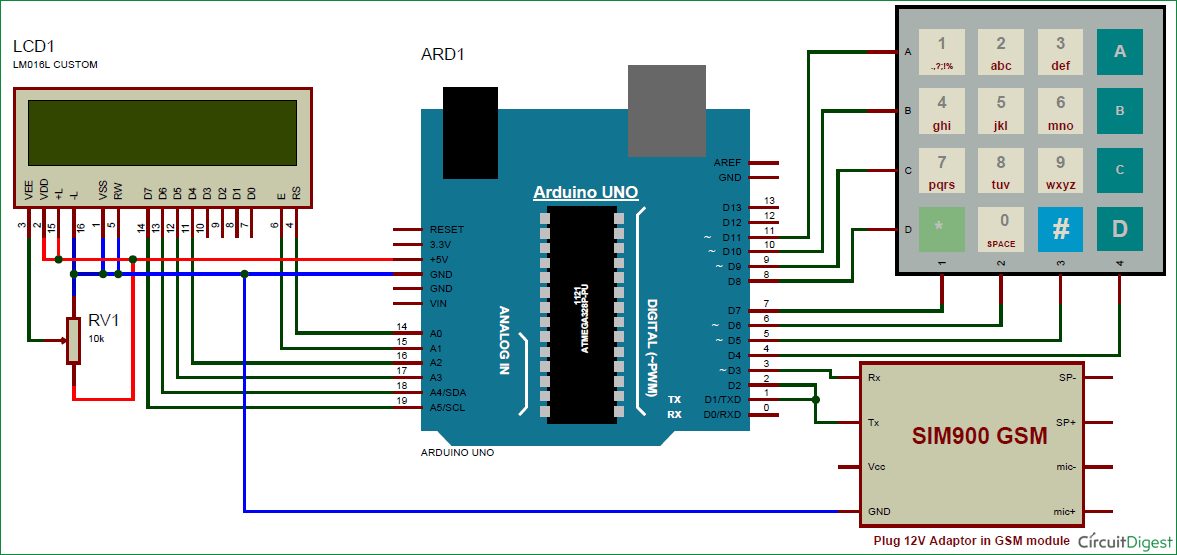
要将数据发送到SparkFun Server,我们需要将键盘和GSM模块连接到Arduino开发板。在这个项目中,我们使用Arduino从键盘输入字符串并发送命令到GSM / GPRS模块。 GSM / GPRS用于与互联网通信,将数据发送到Sparkfun服务器。 GSM模块的Rx和Tx引脚分别与Arduino的引脚D3和D2直接相连(Arduino和GSM的接地必须彼此连接)。 16x2 LCD用于显示输入字符串,并显示欢迎信息和数据发送状态。该16x2 LCD的引脚Rs、en、d4、d5、d6和d7分别与Arduino的引脚号14、15、16、17、18和19连接。4x4键盘用于Arduino的输入字符串,其行引脚R1、R2、R3、R4直接链接到Arduino的引脚11、1、9、8,列引脚C1、C2、C3、C49连接到Arduino的引脚7、6、5、4。
在这里,我们还将GSM Tx引脚连接到Arduino的Tx,以通过串行监视器获取响应数据。
编程说明:
这个项目的编程部分对于初学者来说有点复杂,但是通过做一点练习,你就可以理解。在本代码中,我们使用键盘库来连接简单的键盘输入数字。为了输入字母,我们使用了相同的库和键盘,但使用了多个功能,使其成为字母数字键盘。意味着我们使用的是每个键的多功能,并可以使用10个键输入所有的字符和整数。
如果我们按键2(ABC2),它将在LCD显示'A',如果我们再次按它,它将用'B'替换'A',如果再次按它,它将在同一个地方显示'C' 。如果按下键等待一段时间,光标将自动移动到LCD中的下一个位置。然后我们就可以输入下一个字符或数字。同样的程序也适用于其他键。它与旧手机的键盘相同。
下面我们包括Keypad.h库和定义数组矩阵的键: - #include <Keypad.h> // keypad library for interfacing keypad
- const byte ROWS = 4; //four rows
- const byte COLS = 4; //four columns
- int x=0;
- int y=0;
- int n=0;
- int minValue=0;
- int maxValue=0;
- char keyPress=0;
- int keyPressTime=100;
- String msg="";
- char hexaKeys[ROWS][COLS] =
- {
- {'1','2','3','A'},
- {'4','5','6','B'},
- {'7','8','9','C'},
- {'*','0','#','D'}
- };
- byte rowPins[ROWS] = {11, 10, 9, 8}; //connect to the row pinouts of the keypad
- byte colPins[COLS] = {7, 6, 5, 4}; //connect to the column pinouts of the keypad
void getkey函数用于输入字母 - void getkey(int minValue, int maxValue, char keyPress)
- {
- int ch=minValue;
- int pressed=1;
- char key=keyPress;
- lcd.noBlink();
- for(int i=0;i<keyPressTime;i++)
- {
- if(key==keyPress)
- {
- lcd.setCursor(x,y);
- lcd.print(alpha[ch]);
- ch++;
- if(ch>maxValue)
- ch=minValue;
- i=0;
- }
- ....
- .....
下面的void initGSM()和void initGPRS()函数用于初始化GSM模块和GPRS - void initGSM()
- {
- connectGSM("AT","OK");
- connectGSM("ATE1","OK");
- connectGSM("AT+CPIN?","READY");
- }
- void initGPRS()
- {
- connectGSM("AT+CIPSHUT","OK");
- connectGSM("AT+CGATT=1","OK");
- connectGSM("AT+CSTT="airtelgprs.com","",""","OK");
- connectGSM("AT+CIICR","OK");
- delay(1000);
- Serial1.println("AT+CIFSR");
- delay(1000);
- }
以下部分代码用于创建URL,并通过URL将数据发送到服务器。 - else if(key == 'D')
- {
- lcd.clear();
- lcd.noBlink();
- lcd.print("Sending Data");
- lcd.setCursor(0,1);
- lcd.print("To Server");
- url="GET /input/";
- url+=publicKey;
- url+="?private_key=";
- url+=pvtKey;
- url+="&log=";
- url+=msg;
- url+=" HTTP/1.0\r\n\r\n";
- String svr=Start+","+ip+","+port;
- delay(1000);
- connectGSM(svr,"CONNECT");
- delay(1000);
- int len = url.length();
- String str="";
- str=SendCmd+len;
- sendToServer(str);
然后,我们可以通过GPRS向SparkFun服务器上发送任何数据,以便从世界任何地方进行监控。
代码: - #include <SoftwareSerial.h> // serial software library for interfacing gsm module
- SoftwareSerial Serial1(2, 3); // RX, TX // connect gsm Tx at D2 and Rx at D3
- #include<LiquidCrystal.h> // LCD library for interfacing LCD
- LiquidCrystal lcd(14,15,16,17,18,19); // connect rs,en,d4,d5,d6,d7 respectevely
- String pvtKey="wY9DPG5vzpH99KNrNkx2"; // private key for posting data to sparkfun
- String publicKey="w5nXxM6rp0tww5YVYg3G"; // public key for open page of sparkfun
- String url="";
- String ip=""data.sparkfun.com""; // sparkfun server ip or url
- int port=80; // sparkfun server port
- String SendCmd="AT+CIPSEND="; // sending number of byte command
- String Start="AT+CIPSTART="TCP""; // TCPIP start command
- // strings and variables
- //String msg="";
- String instr="";
- String str_sms="";
- String str1="";
- int i=0,temp=0;
- #include <Keypad.h> // keypad library for interfacing keypad
- const byte ROWS = 4; //four rows
- const byte COLS = 4; //four columns
- int x=0;
- int y=0;
- int n=0;
- int minValue=0;
- int maxValue=0;
- char keyPress=0;
- int keyPressTime=100;
- String msg="";
- char hexaKeys[ROWS][COLS] =
- {
- {'1','2','3','A'},
- {'4','5','6','B'},
- {'7','8','9','C'},
- {'*','0','#','D'}
- };
- byte rowPins[ROWS] = {11, 10, 9, 8}; //connect to the row pinouts of the keypad
- byte colPins[COLS] = {7, 6, 5, 4}; //connect to the column pinouts of the keypad
- Keypad customKeypad = Keypad( makeKeymap(hexaKeys), rowPins, colPins, ROWS, COLS);
- String alpha="1!@_$%?ABC2DEF3GHI4JKL5MNO6PQRS7TUV8WXYZ9* 0#";
- void setup()
- {
- Serial1.begin(9600); // init serial1 for GSM
- lcd.begin(16,2); // init LCD
- lcd.print("Sending Data ");
- lcd.setCursor(0,1);
- lcd.print("to Server");
- delay(2000);
- lcd.clear();
- lcd.print("Circuit Digest");
- lcd.setCursor(0,1);
- lcd.print("Saddam Khan");
- delay(2000);
- lcd.clear();
- lcd.print("Initializing GSM");
- initGSM(); // init GSM module
- lcd.clear();
- lcd.print("Initializing GPRS");
- initGPRS(); // init GPRS in GSM Module
- lcd.clear();
- lcd.print("System Ready");
- delay(2000);
- }
- void loop()
- {
- int n=0;
- lcd.clear();
- lcd.noCursor();
- while(1)
- {
- lcd.cursor();
- char key = customKeypad.getKey();
- if(key=='1')
- getkey(0, 6, key);
- if(key=='2')
- getkey(7, 10, key);
- else if(key=='3')
- getkey(11, 14, key);
- else if(key=='4')
- getkey(15, 18, key);
- else if(key=='5')
- getkey(19, 22, key);
- else if(key=='6')
- getkey(23, 26, key);
- else if(key=='7')
- getkey(27, 31, key);
- else if(key=='8')
- getkey(32,35, key);
- else if(key=='9')
- getkey(36, 40, key);
- else if(key=='*')
- getkey(41, 41, key);
- else if(key=='0')
- getkey(42, 43, key);
- else if(key=='#')
- getkey(44, 44, key);
-
- else if(key == 'C')
- {
- x--;
- lcd.setCursor(x,y);
- lcd.print(" ");
- n--;
- msg[n]=' ';
- lcd.setCursor(x,y);
- }
- else if(key == 'D')
- {
- lcd.clear();
- lcd.noBlink();
- lcd.print("Sending Data");
- lcd.setCursor(0,1);
- lcd.print("To Server");
- url="GET /input/";
- url+=publicKey;
- url+="?private_key=";
- url+=pvtKey;
- url+="&log=";
- url+=msg;
- url+=" HTTP/1.0\r\n\r\n";
- String svr=Start+","+ip+","+port;
- delay(1000);
- connectGSM(svr,"CONNECT");
- delay(1000);
- int len = url.length();
- String str="";
- str=SendCmd+len;
- sendToServer(str);
- Serial1.print(url);
- delay(1000);
- Serial1.write(0x1A);
- delay(1000);
- lcd.clear();
- lcd_status();
- // clearmsg();
- n=0;
- i=0;
- x=0;
- y=0;
- msg="";
- }
- }
- }
- void getkey(int minValue, int maxValue, char keyPress)
- {
- int ch=minValue;
- int pressed=1;
- char key=keyPress;
- lcd.noBlink();
- for(int i=0;i<keyPressTime;i++)
- {
- if(key==keyPress)
- {
- lcd.setCursor(x,y);
- lcd.print(alpha[ch]);
- ch++;
- if(ch>maxValue)
- ch=minValue;
- i=0;
- }
- key=customKeypad.getKey();
- delay(10);
- }
- if(pressed)
- {
- x++;
- msg+=alpha[ch-1];
- n++;
- if(x>15)
- {
- x=0;
- y=1;
- }
- }
- pressed=0;
- lcd.blink();
- }
- void lcd_status()
- {
- lcd.clear();
- lcd.print("Data Sent to");
- lcd.setCursor(0,1);
- lcd.print("Server");
- delay(2000);
- lcd.clear();
- }
- void sendToServer(String str)
- {
- Serial1.println(str);
- delay(1000);
- }
- void initGSM()
- {
- connectGSM("AT","OK");
- connectGSM("ATE1","OK");
- connectGSM("AT+CPIN?","READY");
- }
- void initGPRS()
- {
- connectGSM("AT+CIPSHUT","OK");
- connectGSM("AT+CGATT=1","OK");
- connectGSM("AT+CSTT="airtelgprs.com","",""","OK");
- connectGSM("AT+CIICR","OK");
- delay(1000);
- Serial1.println("AT+CIFSR");
- delay(1000);
- }
- void connectGSM (String cmd, char *res)
- {
- while(1)
- {
- Serial.println(cmd);
- Serial1.println(cmd);
- delay(500);
- while(Serial1.available()>0)
- {
- if(Serial1.find(res))
- {
- delay(1000);
- return;
- }
- }
- delay(1000);
- }
- }
- /*
- Public URL
- http://data.sparkfun.com/streams/w5nXxM6rp0tww5YVYg3G
- Public Key
- w5nXxM6rp0tww5YVYg3G
- Private Key
- wY9DPG5vzpH99KNrNkx2
- Keep this key secret, and in a safe place. You will not be able to retrieve it.
- Delete Key
- xxxxxxxxxxxxx
- This key can only be used once. Keep this key secret, and in a safe place. You will not be able to retrieve it.
- Logging using query string parameters
- Format:
- http://data.sparkfun.com/input/[publicKey]?private_key=[privateKey]&log=[value]
- Example:
- http://data.sparkfun.com/input/w5nXxM6rp0tww5YVYg3G?private_key=wY9DPG5vzpH99KNrNkx2&log=22.21
- */
|