|
在本篇文章中,我们将学习如何基于Arduino开发板使用DHT11或DHT22传感器测量温度和湿度。这两个传感器在电子爱好者中非常受欢迎,因为它们价格便宜,并且提供了出色的性能。以下是这两个传感器之间的主要参数及不同之处: 相对来说,DHT22价格略微贵一些,因为它具有更好的规参数。其温度测量范围为-40〜125度,精度±0.5度,而DHT11温度范围为0〜50度,精度+ -2度。 DHT22传感器也有更好湿度测量范围,可以测量从0至100%,精度达到25%,而DHT11测量的湿度范围为20〜80%,5%的精度。
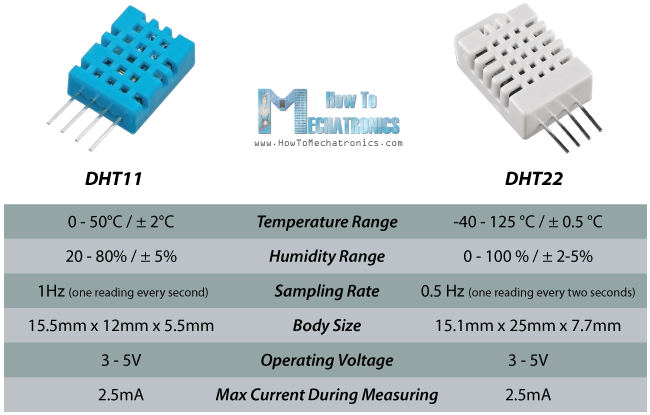
其中有两个参数,DHT11显得比DHT22更好一些。其中一个是采样率,DHT11为1Hz,也就是每秒读取一次数据,而DHT22的采样率是0.5Hz,也就是每两秒读取一次数据。除此之外,DHT11还具有较小的尺寸。两个传感器的工作电压都是3至5V,同时测量时使用的最大电流为2.5毫安。
本篇文章所需的组件如下所示: ● DHT11传感器 ● DHT22传感器 ● Arduino开发板 ● 面包板和跳线
DHT11 / DHT22工作原理 好了,现在让我们来看看这些传感器是如何工作的。它们由湿度感测组件、NTC温度传感器(或热敏电阻)以及传感器背面的IC组成。
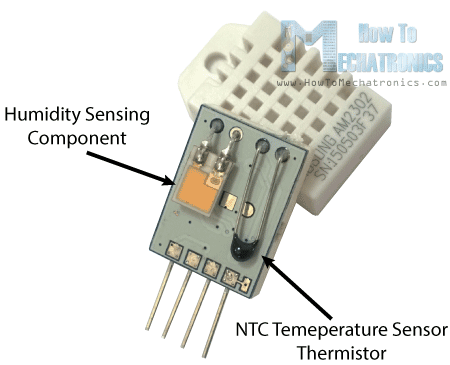
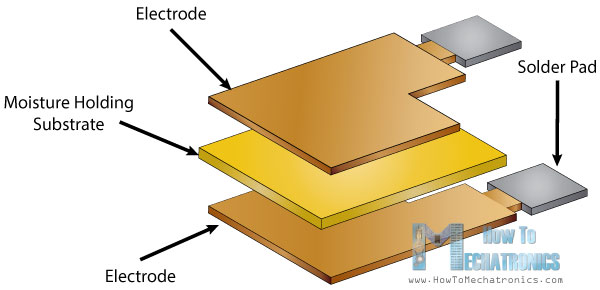
它们使用湿度感测部件测量湿度,这些部件有两个电极,它们之间有保湿基质。因此,随着湿度变化,基质的导电率发生改变,或者说电极之间的电阻发生改变。电阻的这种变化被IC测量和处理,这样就准备好由微控制器读取。
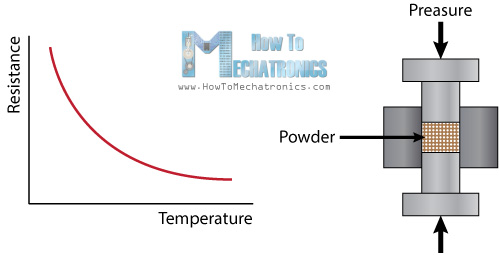
另一方面,这些传感器使用NTC温度传感器或热敏电阻来测量温度。
热敏电阻实际上是一个可变电阻,其阻值随温度的变化而变化。这些传感器由半导体材料如陶瓷或聚合物的烧结制成,以在较小的温度变化时可以提供较大变化的阻值。术语“NTC”表示“负温度系数”,这意味着该电阻随着温度的增加而降低。
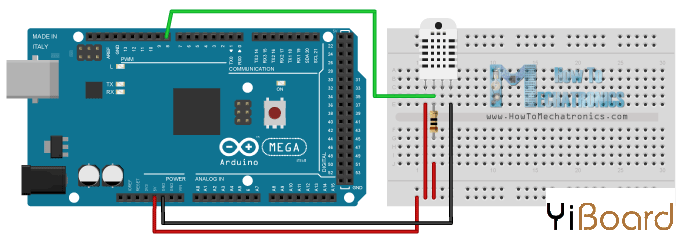
电路原理图 DHTxx传感器有四个引脚,VCC、GND、DATA以及未使用的引脚。一个5K至10K的上拉电阻是必需的,以保持数据线为高电平,并且为了使能传感器和Arduino开发板板之间的通信。传感器的一些版本中内置了上拉电阻,并且仅有3个引脚。
DHTXX传感器具有用于传送数据自己的单线协议。此协议需要精确的时序,用于获取来自传感器的数据的时序图可以从传感器的数据表中找到。不过,我们不必担心太多关于这些时序图,因为我们将使用DHT库完成所有的操作。
源代码 首先,我们需要包含DHT库,该库可从Arduino的官方网站上找到,然后定义传感器所连接的引脚,并创建一个DHT对象。在setup()函数中,我们需要启动串行通讯,因为我们将使用串口监视器打印结果。使用read22()函数,我们将读取来自传感器的数据,并把温度值和湿度值保存到变量T和H中。如果您使用的是DHT11传感器,你需要使用read11()函数。最后,我们将串口监视器上打印温度值和湿度值。 - /* DHT11/ DHT22 Sensor Temperature and Humidity Tutorial
- * Program made by Dejan Nedelkovski,
- * www.HowToMechatronics.com
- */
- /*
- * You can find the DHT Library from Arduino official website
- * https://playground.arduino.cc/Main/DHTLib
- */
-
- #include <dht.h>
- #define dataPin 8 // Defines pin number to which the sensor is connected
- dht DHT; // Creats a DHT object
- void setup() {
- Serial.begin(9600);
- }
- void loop() {
- int readData = DHT.read22(dataPin); // Reads the data from the sensor
- float t = DHT.temperature; // Gets the values of the temperature
- float h = DHT.humidity; // Gets the values of the humidity
-
- // Printing the results on the serial monitor
- Serial.print("Temperature = ");
- Serial.print(t);
- Serial.print(" *C ");
- Serial.print(" Humidity = ");
- Serial.print(h);
- Serial.println(" % ");
-
- delay(2000); // Delays 2 secods, as the DHT22 sampling rate is 0.5Hz
- }
我们将以上代码上传到Arduino开发板,然后就可以在串口显示器上看到传感器的温度值和湿度值。
我还制作了另外一个示例,在LCD上显示这些结果。 以下是该示例的源代码: - /* DHT11/ DHT22 Sensor Temperature and Humidity Tutorial
- * Program made by Dejan Nedelkovski,
- * www.HowToMechatronics.com
- */
- /*
- * You can find the DHT Library from Arduino official website
- * https://playground.arduino.cc/Main/DHTLib
- */
- #include <LiquidCrystal.h> // includes the LiquidCrystal Library
- #include <dht.h>
- #define dataPin 8
- LiquidCrystal lcd(1, 2, 4, 5, 6, 7); // Creates an LCD object. Parameters: (rs, enable, d4, d5, d6, d7)
- dht DHT;
- void setup() {
- lcd.begin(16,2); // Initializes the interface to the LCD screen, and specifies the dimensions (width and height) of the display
- }
- void loop() {
- int readData = DHT.read22(dataPin);
- float t = DHT.temperature;
- float h = DHT.humidity;
- lcd.setCursor(0,0); // Sets the location at which subsequent text written to the LCD will be displayed
- lcd.print("Temp.: "); // Prints string "Temp." on the LCD
- lcd.print(t); // Prints the temperature value from the sensor
- lcd.print(" C");
- lcd.setCursor(0,1);
- lcd.print("Humi.: ");
- lcd.print(h);
- lcd.print(" %");
- delay(2000);
- }
以上就是本篇文章的全部内容。如果遇到任何问题,请随时在本帖下面进行回复,我会及时为您解答。 |